
FREE ATS-FRIENDLY CV TEMPLATE FOR WORD
Applying through an online recruitment system? This editable Word CV uses a straightforward one-column structure, conventional section headings and text-based content so your career information is not dependent on decorative graphics or complicated page elements.
Microsoft Word (.docx) • One-column layout • No photo • Editable • No account required
What Does ATS-Friendly Actually Mean?
An applicant tracking system, usually shortened to ATS, is recruitment software that can store applications and extract information from submitted CVs. Different employers use different systems, configurations and recruitment processes, so “ATS-friendly” should not be treated as a promise that one template will behave identically everywhere.
For a CV template, the practical goal is simpler: avoid making important career information unnecessarily difficult to identify. That usually means using recognisable section headings, keeping important details as normal text and avoiding decorative elements that are not needed to communicate your experience.
This template follows that approach, but your content still matters. A technically simple CV filled with irrelevant information or keywords you do not genuinely match is not automatically a strong application.
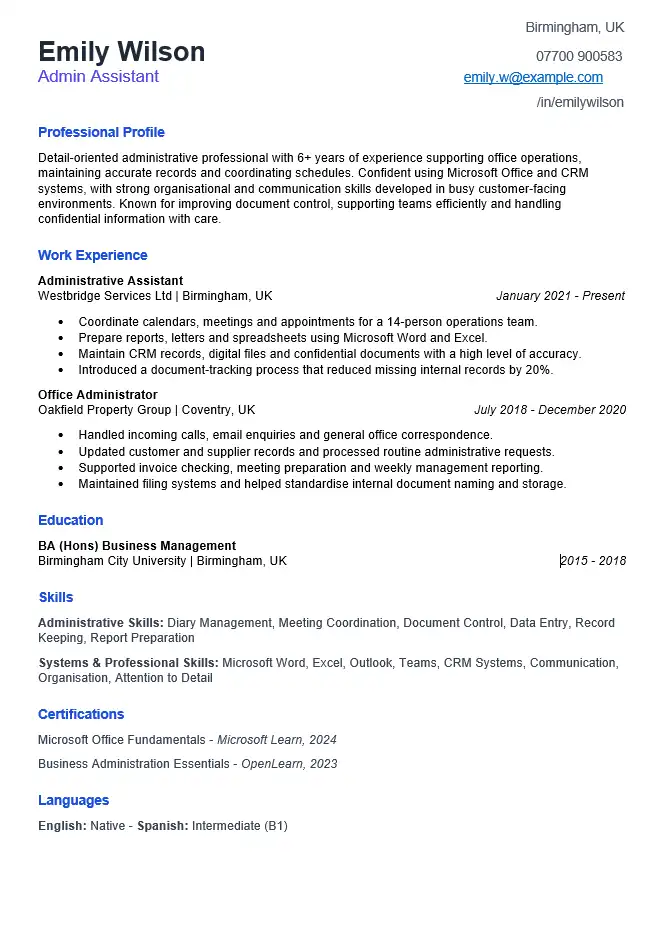
ATS-Friendly CV Template Preview
The preview below shows the same one-column CV included in the downloadable Microsoft Word file.
Template Details
File: Microsoft Word (.docx)
Layout: One column
Photo: No
Example role: Administrative Assistant
Main content: Standard text sections
Account required: No
Why We Kept This Word CV Simple
The downloadable example is deliberately less decorative than our modern or professional CV templates. That is a design decision rather than an attempt to make the document visually impressive.
- One main reading column: career information follows a straightforward top-to-bottom order.
- Conventional headings: sections use familiar labels such as Professional Profile, Work Experience, Education and Skills.
- No candidate photo: the document does not depend on an image to communicate important information.
- No skill charts or rating bars: skills are written as text rather than displayed only as visual scores.
- No decorative sidebar: contact details and experience remain part of the main document flow.
- Dates sit beside the relevant entries: employment and education information remains visually connected.
None of these choices guarantees how every recruitment platform will parse the file. They simply reduce design complexity that is not necessary to explain the candidate’s qualifications.
The Template Is Only Half of the ATS Problem
A simple layout cannot compensate for a CV that does not reflect the vacancy. When preparing an application, separate the task into two parts:
1. Can the information be identified clearly?
- Are job titles clear?
- Are employer names obvious?
- Are employment dates easy to associate with the correct role?
- Are qualifications written as text?
- Do sections use understandable headings?
2. Does the information match the vacancy?
- Does the CV show the relevant skills?
- Are required tools or systems mentioned when you genuinely use them?
- Are required qualifications clearly stated?
- Does recent experience demonstrate the responsibilities the employer cares about?
- Have irrelevant details pushed stronger evidence down the page?
A CV can have a very simple layout and still be poorly targeted. Conversely, copying every phrase from a job advert does not make a CV better if those words do not accurately describe your experience.
Use the Job Advert to Find Relevant Terms
Before editing the Word file, read the vacancy and highlight the requirements that repeatedly appear or seem central to the role.
Imagine an Administrative Assistant vacancy includes:
- calendar management;
- Microsoft Excel;
- data entry;
- customer enquiries;
- document preparation;
- accurate record keeping.
Now compare those requirements with what you have genuinely done.
Vacancy Says
- Calendar management
- Microsoft Excel
- Data entry
- Customer enquiries
Your Evidence Might Say
- Coordinated appointments for a six-person team.
- Prepared monthly spreadsheets using Excel.
- Updated customer and order records in a CRM.
- Responded to telephone and email enquiries.
The wording does not need to be copied mechanically. Use terminology from the vacancy when it accurately describes your real experience.
Do Not “Optimise” Your CV by Stuffing It With Keywords
A job advert is useful because it shows how the employer describes the role. It is not a list of phrases that should automatically be copied into your CV.
Weak approach
Calendar management, data entry, CRM, Microsoft Excel, customer service, reporting, organisation, administration.
Better approach
Coordinated weekly calendars for five managers, updated customer records in the company CRM and prepared monthly tracking spreadsheets using Microsoft Excel.
The second version uses relevant terminology while also explaining what the candidate actually did.
Never add a certification, tool, qualification or responsibility simply because you believe an ATS may be searching for it.
How the ATS-Friendly CV Example Is Written
The downloadable template uses an Administrative Assistant example. The content is written so important information such as the candidate’s role, dates, tools and responsibilities appears in ordinary text rather than relying on visual labels.
Professional Profile
Administrative professional with experience supporting office operations, maintaining accurate records and coordinating schedules. Confident using Microsoft Office and customer record systems, with practical experience handling enquiries, preparing documents and keeping information organised.
The profile identifies the type of work and relevant tools without becoming a long list of isolated keywords.
Work Experience
Administrative Assistant
Westbridge Services Ltd | Birmingham
2021–PresentMaintain digital records and update customer information accurately.
Coordinate meetings and internal schedules for the office team.
Prepare reports, spreadsheets and correspondence using Microsoft Word and Excel.
The job title, employer and dates remain easy to associate with the responsibilities beneath them. The tools appear naturally where they were actually used.
Word Formatting Choices Worth Checking
A CV may start with a simple structure and become more complicated while you edit it. Before submitting the file, check what has changed in Word.
Headers and Footers
Do not rely on the document header or footer as the only place containing essential contact or career information. Keep important information within the main document body.
Text Boxes
Text boxes can be convenient for visual design, but essential information does not need to be placed inside them. This template keeps the main CV content in a straightforward document flow.
Tables and Multiple Columns
Tables and columns are not automatically unusable in every recruitment system, but they create more structural complexity than a simple one-column document. This template deliberately avoids depending on them for the main career history.
Images and Skill Graphics
Do not use an icon, chart, progress bar or image as the only way to communicate a qualification or skill. Write important information as text.
Unusual Section Names
Creative headings may look distinctive to a person but can make the structure less obvious. Familiar labels such as Work Experience, Education and Skills communicate the purpose of the section immediately.
ATS-Friendly Does Not Mean Visually Empty
A CV can still use sensible typography, spacing, bold text and a clear hierarchy. The objective is not to turn the document into an unformatted text file.
The more useful distinction is between styling that helps a reader understand the document and styling that carries information the text itself does not contain.
Useful Presentation
- Clear heading sizes
- Consistent spacing
- Bold job titles
- Readable fonts
- Simple bullet points
- Logical section order
Be More Careful With
- Multiple text boxes
- Complex tables
- Several reading columns
- Charts used instead of text
- Icons replacing labels
- Important content in headers or footers
Should You Send DOCX or PDF to an ATS?
There is no reason to guess when the employer tells you what to upload. If the application asks for a Word document, submit the requested Word document. If it requests PDF, send PDF.
When more than one format is accepted, keep your editable DOCX as the master version and make sure any PDF you create contains selectable text rather than being an image of the CV.
The application instructions should take priority over generic advice found online.
ATS-Friendly CV vs Simple CV Template
These templates overlap because both avoid unnecessary complexity, but they answer different questions.
ATS-Friendly CV
Use this template when your main concern is submitting through an online recruitment process and you want a conventional one-column structure with important information kept as standard text.
Simple CV
Use our simple CV template for Word when your priority is a straightforward, easy-to-edit presentation without specifically designing the page around ATS considerations.
Common ATS CV Mistakes
- Believing a template can guarantee an ATS result. Recruitment software and employer configurations vary.
- Keyword stuffing. Relevant terminology should describe your real qualifications and experience.
- Hiding important information inside graphics. Keep qualifications, dates, job titles and skills available as text.
- Using unusual headings for standard information. Creative labels can make the purpose of a section less obvious.
- Putting essential contact details only in the Word header or footer. Keep critical information in the main document body.
- Submitting the same CV for every vacancy. Different jobs place value on different experience and terminology.
- Changing the template into a complicated layout. After editing, check whether you have introduced unnecessary tables, boxes or columns.
- Ignoring the requested upload format. Follow the employer’s application instructions.
- Optimising for software but not for the recruiter. The CV still needs to be clear, credible and useful to a person reading it.
Check Your CV Before Uploading It
- The job title and employer for each position are clear.
- Employment dates are consistent.
- Section headings describe their contents clearly.
- Your most important qualifications are written as text.
- Relevant skills from the vacancy appear only when you genuinely possess them.
- Important information is not contained only in images or decorative graphics.
- No example information from the template remains.
- Spelling, telephone number and email address are correct.
- The filename is professional, for example Emily-Wilson-CV.docx.
- The file type matches the employer’s instructions.
Download the ATS-Friendly CV Template for Word
Download the editable one-column DOCX shown above and replace the example content with your own employment, education and skills.
Microsoft Word (.docx) • One-column layout • Editable • No account required
ATS-Friendly CV FAQs
Can any CV template guarantee that I will pass an ATS?
No. Applicant tracking systems, employer settings and recruitment processes vary. A straightforward template can reduce unnecessary formatting complexity, but no Word or PDF template can guarantee a particular ATS result or an interview.
Do I need to copy keywords exactly from the job advert?
Use relevant terminology when it accurately describes your own background. A vacancy can help you understand which skills, systems and qualifications matter, but you should not add keywords for experience you do not have.
Are columns always rejected by ATS software?
No single rule applies to every recruitment system. However, complex multi-column documents create more layout structure than a straightforward one-column CV. This template takes the simpler approach rather than claiming that every ATS handles every layout in the same way.
Should my CV have a photo?
This template does not use a photo because a candidate image is not needed to communicate qualifications, employment history or skills. Whether a photo is appropriate can also depend on the country, profession and application instructions.
Is DOCX better than PDF for ATS applications?
Follow the employer’s instructions first. Many recruitment systems accept Word documents and text-based PDFs, but accepted formats vary. Keep an editable DOCX master and submit the file type requested for the vacancy.
Can I change the template design?
Yes, but check the document again afterwards. Adding several text boxes, complex tables, multiple columns or graphics may remove the simplicity that was the reason for choosing this template.
Other Word CV Formats
Simple CV Template
A straightforward Word format when ease of editing and a clean presentation are your main priorities.
Professional CV Template
A more polished business-style layout for experienced candidates.
Blank CV Template
A ready-made Word structure with prompts instead of completed career content.