
FREE SIMPLE CV TEMPLATE FOR WORD
Want a CV that is easy to read, easy to edit and does not rely on decorative design? This simple Word CV template uses a restrained one-column layout so your job titles, experience, education and skills remain the main focus.
Microsoft Word (.docx) • One-column layout • Editable • No account required
A Simple CV Is Not an Empty CV
Simple refers to the way information is presented, not to how much experience you have. A strong simple CV can still contain substantial career information, achievements and qualifications.
The difference is that the design does not compete with the content. Instead of using multiple sidebars, decorative charts or several visual zones, the reader follows a clear sequence from one section to the next.
This makes a simple format particularly useful when you want your experience to do most of the work and you do not need a distinctive visual identity for the application.
Simple CV Template Preview
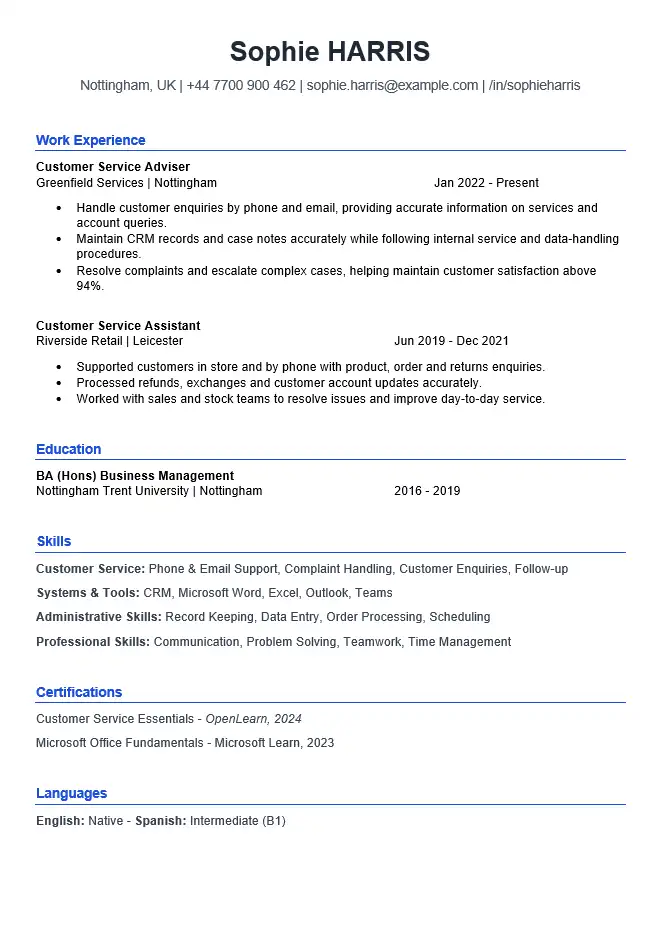
The preview below shows the same customer service CV included in the downloadable Microsoft Word file.
Template Details
File: Microsoft Word (.docx)
Layout: One column
Photo: No
Example: Customer Service
Style: Clean and restrained
Account required: No
Why This Template Looks Simple
The design choices are deliberately restrained. Simplicity comes from removing elements that are not needed to explain the candidate’s background.
- One clear reading path: information moves from top to bottom rather than across several visual areas.
- Familiar section headings: the reader can quickly recognise profile, experience, education and skills.
- Consistent typography: size and weight create hierarchy without relying on several fonts.
- Visible job titles and dates: important career information does not disappear inside decorative components.
- Useful white space: sections are separated without large decorative gaps.
- No visual skill ratings: abilities are written as text rather than represented by bars, stars or percentages.
The result should feel straightforward rather than unfinished.
Can Someone Understand Your CV Without Searching for Information?
A useful simple CV makes the important facts easy to locate. When reviewing your finished document, check whether someone can quickly identify:
- what type of work you currently do;
- where you most recently worked;
- when you worked there;
- what responsibilities were most relevant;
- which achievements support the application;
- which qualifications or skills matter to the vacancy.
If the reader has to search around the page to answer basic questions about your background, simplifying the visual design alone has not solved the problem. The information hierarchy also needs work.
How the Simple CV Example Works
The downloadable template uses a customer service example because this type of role benefits from a clear presentation of practical experience, customer contact and results without needing an elaborate design.
Personal Profile
Reliable customer service professional with five years of experience supporting customers across retail and service environments. Confident handling enquiries, resolving problems and maintaining accurate records, with a strong focus on clear communication and consistent service.
The profile gives context, but it stays brief so the employment history remains the strongest part of the page.
Most Recent Experience
Customer Service Adviser
Greenfield Services Ltd | Nottingham
2022–Present
- Respond to customer enquiries by telephone and email and provide accurate information about services and account queries.
- Maintain customer records and update case notes using the company CRM system.
- Resolve routine complaints and escalate complex cases according to internal procedures.
- Achieved an average customer satisfaction score above 94% during the most recent review period.
The design does not need to draw attention to the achievement with a chart or coloured badge. The result is already clear in the text.
Simple Does Not Mean Generic
The design can stay the same while the content changes substantially for each application.
For example, imagine a vacancy repeatedly asks for:
- telephone and email customer support;
- CRM experience;
- complaint handling;
- accurate record keeping;
- clear communication.
If those requirements match your genuine experience, they deserve more visibility than unrelated duties. A simple layout gives you fewer visual distractions, so weak or generic content becomes easier to notice as well.
Do not rely on the clean design to make an untargeted CV effective. The wording still needs to respond to the role.
A Clear Hierarchy Matters More Than Decoration
When everything has the same visual importance, even a minimalist CV can become difficult to scan.
Make These Easy to Notice
- your name;
- section headings;
- job titles;
- employer names;
- dates;
- qualifications.
Keep These Visually Secondary
- individual bullet points;
- supporting descriptions;
- optional information;
- less relevant older details.
You should not need several colours, oversized headings or graphic elements to create this distinction. Consistent spacing, font size and weight can do most of the work.
Why a Simple Word CV Is Easier to Maintain
Your CV is rarely edited only once. New jobs, achievements, courses and applications mean the document will change over time.
A restrained Word layout can make those updates easier because there are fewer design relationships to preserve.
Adding a New Job
You can add the new position above the previous one and retain the same heading, date and bullet structure without rebuilding a sidebar or moving several graphic elements.
Removing a Section
If certifications or languages are not relevant, removing that section should not leave a large visual hole in the page.
Creating Another Version
You can keep one master DOCX and save separate copies for different vacancies, changing the emphasis without redesigning the entire document each time.
Do Not Remove Useful Detail Just to Make the CV Look Cleaner
Minimal design should not become minimal evidence.
For example, this is too vague:
Helped customers and dealt with complaints.
A simple CV has enough room to be more useful:
Resolved routine customer complaints by telephone and email and escalated complex cases according to service procedures.
Keep the design restrained, but give important responsibilities enough detail to mean something.
Simple CV vs ATS-Friendly CV
These templates intentionally overlap in some areas, but they are not identical choices.
Simple CV Template
Choose this when your main priorities are readability, straightforward presentation and a Word document that is easy to maintain.
ATS-Friendly CV Template
Choose the ATS-friendly CV template when your specific concern is reducing unnecessary structural complexity for applications submitted through recruitment systems.
A simple-looking CV is not automatically guaranteed to work perfectly with every applicant tracking system, and no template can make that guarantee.
Simple CV vs Modern CV
The choice is mainly about how much visual styling you want the document itself to carry.
Choose Simple When…
- you want the experience to dominate the page;
- you prefer a restrained one-column structure;
- you expect to update the CV regularly;
- you do not need a visually distinctive application document.
Choose Modern When…
- you want a stronger visual identity;
- the role or industry makes contemporary presentation useful;
- you are comfortable maintaining a more designed layout in Word.
When a Simple CV Starts Looking Cluttered
A minimalist template can still become difficult to read after several rounds of editing. Watch for these signs:
- every section contains long paragraphs;
- job entries have too many bullets;
- several unrelated certifications have been added;
- the skills section has become a long keyword list;
- headings and body text are too close together;
- older jobs receive the same detail as recent roles;
- you have reduced spacing or font size simply to make everything fit.
The solution is usually to edit the content before adding more design. Remove repetition, reduce detail that no longer matters and give the strongest evidence room to breathe.
Common Simple CV Mistakes
- Confusing simple with generic. The layout can remain simple while the content is tailored to each job.
- Removing too much detail. Important responsibilities still need enough context to be meaningful.
- Using every available section. Remove sections that do not strengthen the application.
- Making everything visually identical. Job titles and headings still need a clear hierarchy.
- Adding decoration later. Multiple colours, icons and boxes can gradually turn a simple layout into a cluttered one.
- Listing skills without context. Whenever possible, support important skills through your experience or achievements.
- Giving old and new jobs equal weight. Recent relevant experience usually deserves more detail.
- Assuming a simple template removes the need to tailor the CV. Design and content solve different problems.
How to Edit This Simple CV in Microsoft Word
- Download the DOCX file and open it in Microsoft Word.
- Replace the example name and contact details with your own.
- Rewrite the profile around the type of role you are targeting.
- Add your employment history in a clear and consistent order.
- Give recent relevant positions more detail than older supporting roles.
- Replace example achievements with genuine evidence from your own work.
- Update education, certifications and skills only where they are relevant.
- Remove any section that does not add useful information.
- Keep heading styles, spacing and date formatting consistent.
- Check the finished document at normal zoom before submitting it.
- Keep an editable master DOCX and create tailored copies for different applications.
If replacing the example content causes the page to move or sections to break, see our guide to editing a CV template in Microsoft Word.
Download the Simple CV Template for Word
Download the same editable customer service CV shown above and replace the example information with your own experience, education and skills.
Microsoft Word (.docx) • Editable • No account required
Simple CV FAQs
Does a simple CV look unprofessional?
No. A restrained layout can look professional when typography, spacing, headings and content are consistent. Simple should mean clear and intentional, not unfinished.
Does a simple CV have to be one page?
No. Simple describes the presentation rather than the length. Use one or two pages according to the amount of relevant evidence you need to present.
Can an experienced professional use a simple CV?
Yes. An experienced candidate may prefer a restrained format when career history and achievements are more important than visual styling.
Is a simple CV the same as an ATS-friendly CV?
Not exactly. The two formats can share characteristics such as clear headings and restrained styling, but this page focuses on readability and ease of editing. Our ATS-friendly template is specifically designed around reducing unnecessary layout complexity for online applications.
Can I add colour to a simple CV?
You can make restrained changes, but colour should not become the only way important information is distinguished. Keep contrast readable and the overall visual hierarchy consistent.
What if my content no longer fits the template?
Review repeated and less relevant information first. If important content still requires more room, use a longer layout rather than continually shrinking the text or spacing.
Related Word CV Templates
Professional CV Template
A more polished business-style Word layout for candidates who want stronger visual structure.
Modern CV Template
A contemporary Word CV with a more visible design identity and stronger use of layout.
ATS-Friendly CV Template
A deliberately simplified structure for candidates particularly concerned about online recruitment systems.