
FREE PROFESSIONAL CV TEMPLATE FOR WORD
Download an editable professional CV template for Microsoft Word designed to present career progression, responsibilities, achievements and professional skills in a polished two-column layout.
Microsoft Word (.docx) • Editable • Two-column layout • No account required
What Makes a CV Look Professional?
A professional CV is not simply a CV with a more polished design. The content should also make your level of responsibility, experience and contribution easy to understand.
For an experienced applicant, a reader should be able to identify questions such as:
- What level has this person worked at?
- What were they responsible for?
- How large was the team, function, budget or workload?
- What changed because of their work?
- Have they progressed into greater responsibility?
- Which achievements are most relevant to this vacancy?
The template provides the visual structure. Your evidence is what makes the finished CV professional.
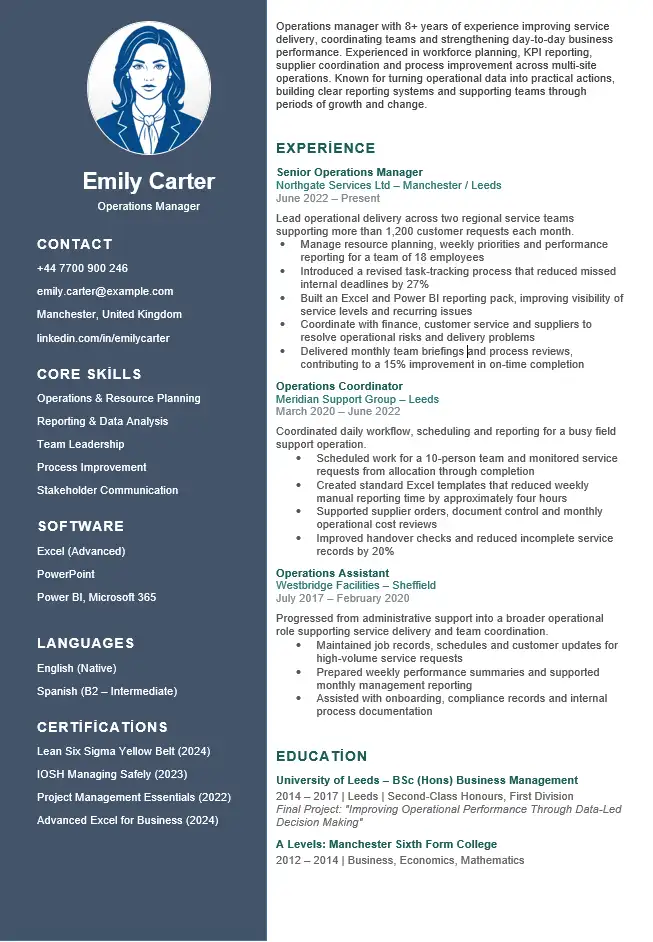
Professional CV Template Preview
The preview below shows the same professional CV included in the downloadable Word file.
Template Details
File: Microsoft Word (.docx)
Layout: Two columns
Style: Professional business layout
Example: Operations Manager
Best suited to: Experienced professionals
Account required: No
Professional Experience Needs Context, Not Just Job Titles
A job title tells the reader your position, but it does not always explain the level at which you operated.
Two Operations Managers may have very different responsibilities. One may supervise five people in a single office, while another may lead multiple regional teams and manage substantial budgets.
Where it genuinely applies, useful context may include:
- team size;
- number of sites or locations;
- budget responsibility;
- customer or account volume;
- geographical coverage;
- project value;
- senior stakeholders supported;
- revenue or cost responsibility;
- operational scale.
This type of context helps the reader understand your professional level without relying on vague labels such as “senior” or “experienced”.
Responsibilities Explain the Job. Achievements Explain Your Contribution.
A professional CV usually needs both.
Responsibilities establish the scope of your role:
Coordinate daily workflows across a 12-person operations team and monitor delivery against weekly service targets.
An achievement then shows what changed because of your work:
Introduced a revised task-tracking process that reduced missed internal deadlines by 25%.
The first statement explains the remit. The second gives evidence of impact.
Do not force a percentage or financial figure into every bullet. Quantification is useful when the number is genuine and helps explain scale or outcome.
How the Professional CV Example Works
The downloadable example is built around an operations professional. It shows how career information can be presented differently from a basic list of duties.
Professional Profile
Operations professional with experience coordinating teams, improving internal processes and supporting day-to-day business performance. Skilled in workflow planning, stakeholder communication and performance reporting, with practical experience introducing changes that improve efficiency and service delivery.
The profile establishes the candidate’s area of work and value without trying to list every skill on the CV.
Recent Experience
Operations Coordinator
ABC Services Ltd | Manchester
2022–Present
- Coordinate daily workflows across a team of 12 employees and support delivery against weekly operational targets.
- Prepare performance reports for management and identify recurring issues affecting service efficiency.
- Introduced a revised task-tracking process that reduced missed internal deadlines by 25%.
- Work with customer service, finance and management teams to resolve operational problems and improve communication between departments.
The entry combines scope, routine responsibility, cross-functional work and a measurable improvement rather than presenting four similar task descriptions.
Show Career Progression, Not Just Career History
A professional CV becomes stronger when the reader can understand how your responsibilities have changed over time.
Progression can appear in different ways:
- promotion to a more senior title;
- larger teams;
- greater decision-making responsibility;
- larger or more complex projects;
- ownership of budgets or commercial targets;
- movement from delivery into leadership;
- increased responsibility for clients or stakeholders;
- broader geographical or organisational scope.
Not every career follows a straight promotion path. Progression can also mean becoming a deeper specialist, taking on more complex work or becoming responsible for higher-value decisions.
Make Leadership Visible Through Evidence
Simply describing yourself as a strong leader tells the employer very little.
If leadership is important to the target role, show what leadership meant in practice:
- How many people did you lead?
- Did you recruit, coach or develop team members?
- Were you responsible for performance reviews?
- Did you lead through organisational or operational change?
- Did you make decisions affecting budget, service or risk?
- Which senior stakeholders did you influence?
- Did your team improve performance under your leadership?
This turns leadership from a personal claim into evidence the reader can evaluate.
Use Business Impact When the Role Justifies It
For management, commercial and senior professional roles, the reader may care not only about what you delivered but also about why it mattered to the organisation.
Operational Impact
- reduced processing time;
- improved service levels;
- reduced errors;
- increased capacity;
- improved compliance;
- reduced risk.
Commercial Impact
- revenue growth;
- cost reduction;
- margin improvement;
- new client acquisition;
- contract value;
- business retention.
People Impact
- team development;
- staff retention;
- performance improvement;
- recruitment;
- training;
- change adoption.
Use the categories that genuinely match your work. A professional CV does not need artificial commercial language for a role where it would be inappropriate.
Your Profile Is Optional — Make It Earn the Space
A professional profile can be useful when it quickly establishes your field, level and strongest areas of experience.
It becomes less useful when it is built from broad statements such as:
Dynamic, motivated and results-driven professional with excellent leadership and communication skills.
Those claims are difficult to evaluate and could describe thousands of candidates.
If your career highlights or recent experience communicate your value more effectively, you can shorten the profile substantially or remove it. The template should adapt to the evidence you have rather than force every applicant into exactly the same structure.
Older Experience Should Not Compete With Your Current Level
Experienced professionals often make their CV longer by describing every job in equal detail.
Your most recent and relevant positions normally deserve more space because they better represent your current professional level.
Recent Relevant Role
- scope of responsibility;
- key achievements;
- leadership;
- systems or technical work;
- stakeholders;
- commercial or operational results.
Older Supporting Role
An older job may need only the title, employer, dates and one or two relevant points.
If an older role is unusually relevant to the vacancy, however, keep the detail that matters. Relevance is more important than applying a fixed date rule.
Tailor the Same Professional CV to Different Roles
The template can remain the same while the emphasis changes for each application.
Imagine one candidate has experience in operations, people management and process improvement.
For an Operations Manager Vacancy
Give more visibility to service performance, workflow improvement, planning, KPIs and operational scale.
For a Team Manager Vacancy
Increase the emphasis on team size, coaching, performance management, recruitment and staff development.
For a Process Improvement Vacancy
Bring measurable efficiency improvements, change projects, systems and problem-solving examples closer to the top.
This is more useful than sending exactly the same professional CV to every employer.
Professional Does Not Mean Corporate
You do not need to fill the CV with business jargon simply because the template is called professional.
Compare:
Results-driven strategic professional leveraging cross-functional synergies to deliver best-in-class operational excellence.
with:
Led a 12-person operations team and introduced a new workflow that reduced missed internal deadlines by 25%.
The second version is easier to understand because it gives the reader something concrete to evaluate.
Professional CV vs Simple CV
The difference is not that one is suitable for “professional people” and the other is not.
Professional CV Template
Choose this format when you want a stronger visual structure and have enough professional experience, achievements and additional information to benefit from the two-column design.
Simple CV Template
Choose the simple CV template when you prefer a restrained one-column format where ease of reading and editing are the main priorities.
Professional CV vs Modern CV
Both can look polished, but they place different emphasis on presentation.
Professional
- business-style appearance;
- strong focus on experience and professional credibility;
- useful for management, operations, finance and corporate roles;
- restrained visual identity.
Modern
- more contemporary visual presentation;
- stronger use of colour and design;
- useful when visual presentation is part of the intended impression;
- requires more care when editing the design in Word.
Common Professional CV Mistakes
- Writing a job description instead of a CV. Show what you contributed, not only what the role normally involves.
- Using senior-sounding adjectives instead of evidence. Demonstrate leadership, scale and impact.
- Giving every position equal detail. Prioritise the roles that best represent your current level.
- Burying achievements. Important outcomes should be easy to find.
- Using numbers without context. A percentage is useful only when the reader understands what improved.
- Listing every achievement you have ever had. Select evidence that supports the target role.
- Overloading the sidebar. Skills, software, certifications and languages still need to remain selective.
- Using vague business jargon. Clear evidence is stronger than inflated wording.
- Failing to show progression. Help the reader understand how your scope has changed over time.
How to Edit the Professional CV Template in Word
- Download the DOCX file and open it in Microsoft Word.
- Replace the example name, contact information and job title with your own.
- Decide which type of role you are targeting before rewriting the content.
- Update the professional profile or remove it if stronger evidence deserves the space.
- Add your most recent and relevant employment history.
- Give enough context to show the scale and level of your responsibilities.
- Replace routine example duties with genuine achievements where appropriate.
- Update skills, software, languages and certifications in the sidebar.
- Remove optional information that does not support the application.
- Check that recent roles receive more detail than older supporting roles.
- Review both columns after editing to make sure the layout still feels balanced.
- Keep an editable Word master copy for future applications.
If replacing the example text changes the layout, see our guide to editing a CV template in Microsoft Word.
Download the Professional CV Template for Word
Download the editable professional Word CV shown above and replace the example content with your own experience, achievements, education and professional skills.
Microsoft Word (.docx) • Editable professional CV • No account required
Professional CV FAQs
What should make a professional CV different from a basic CV?
The strongest difference is usually the depth of professional evidence. Experienced candidates should make responsibility, achievements, progression and professional scope easy to understand rather than relying only on a more polished design.
Should every bullet point include a number?
No. Numbers are useful when they provide genuine context or demonstrate an outcome. Do not invent percentages or force metrics into work that cannot reasonably be measured.
Should I list responsibilities or achievements?
Usually both have a purpose. Responsibilities explain your scope, while achievements show what you improved, delivered or contributed. Avoid turning the entire employment section into a generic job description.
Do I need a professional profile?
No section is valuable simply because it is traditional. A concise profile can help establish your field and professional level, but it should not repeat vague qualities that the rest of the CV already demonstrates.
How far back should professional experience go?
There is no single cut-off that works for every career. Give most space to recent and relevant work. Older roles can be shortened or grouped when they no longer add important evidence, while unusually relevant earlier experience can still deserve detail.
Can I use this template for a senior role?
Yes, but senior applications may need more emphasis on leadership, strategic decisions, commercial or operational scale and measurable impact. The content should reflect the level of the role rather than simply keeping the example wording.
Is this template guaranteed to work with every ATS?
No CV template can guarantee compatibility with every applicant tracking system. If reducing layout complexity is your main priority, use the ATS-friendly CV template for Word.
Related Word CV Templates
Simple CV Template
A restrained one-column CV for applicants who want straightforward structure and easy editing.
Modern CV Template
A contemporary Word CV with a stronger visual identity and more visible use of design.
Two-Page CV Template
For experienced candidates who need more room for relevant career history, achievements and qualifications.