FREE BLANK CV TEMPLATE FOR WORD
Want a CV layout without somebody else’s career history already filled in? Download this blank Microsoft Word CV template, replace the prompts with your own information and remove any sections you do not need.
Microsoft Word (.docx) • Blank prompts • Fully editable • No account required
What Does “Blank CV Template” Mean?
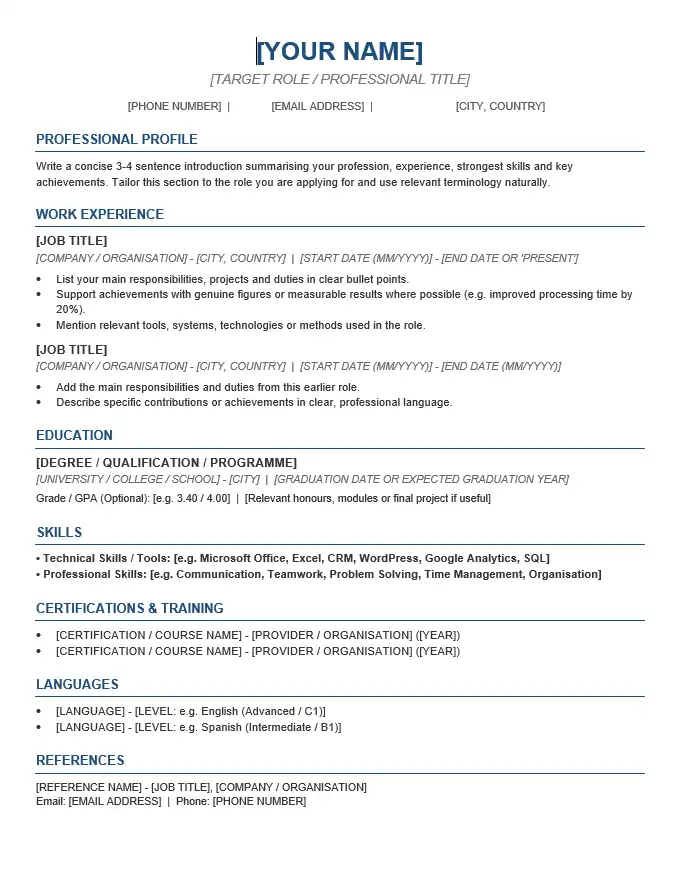
This is not an empty white page and it is not a completed fictional CV. The Word file already contains a CV layout, section headings and prompts such as [Your Name], [Professional Profile] and [Job Title]. Your job is to replace those prompts with your own information.
A blank template is most useful when you already have an idea of what you want to say but do not want to spend time building margins, headings, spacing and section structure from scratch.
You are not required to use every field in the document. If a section does not apply to your career history or the job you are targeting, remove it rather than filling it with irrelevant information.
Blank CV Template Preview
The preview below shows the same blank CV structure included in the downloadable Word document.
Template Details
File type: Microsoft Word (.docx)
Content: Blank prompts
Editing: Replace text directly in Word
Example career history: None
Sections removable: Yes
Account required: No
What You Will See When You Open the Word File
The placeholders are instructions, not text that should remain in the finished CV. They show where your information belongs while keeping the document structure intact.
Identity & Contact
- [Your Name]
- [Professional Title]
- [Phone Number]
- [Email Address]
- [Location]
- [LinkedIn Profile]
Career History
- [Professional Profile]
- [Job Title]
- [Employer]
- [Employment Dates]
- [Responsibilities]
- [Key Achievement]
Qualifications & Skills
- [Qualification]
- [University or College]
- [Education Dates]
- [Skills]
- [Certifications]
- [Languages]
Some of these fields may not be useful for you. For example, a LinkedIn profile is unnecessary if you do not have a relevant professional profile, while certifications may deserve more space for one occupation than another.
Fill the Blank CV in This Order
You do not have to complete the document from top to bottom in one sitting. A more practical approach is to fill the factual sections first, then write the sections that require more judgement.
1. Start With Facts
Replace your name, telephone number, email address, location, job titles, employers, dates and qualifications first. These details are easier to verify and give you the basic shape of the finished document.
2. Add Your Most Relevant Experience
Replace the experience prompts with real positions from your own career. You do not have to copy every responsibility from every job. Give more space to experience that helps the employer understand why you fit the vacancy.
3. Add Evidence, Not Just Duties
Where you genuinely have a result, improvement, responsibility or achievement worth mentioning, add it. Do not invent numbers merely because a placeholder asks for a “Key Achievement”. Delete the prompt if you do not have a meaningful example.
4. Choose Relevant Skills
Do not treat the skills area as a checklist that must be filled. Select abilities that matter for the vacancy and that the rest of your CV can support.
5. Write the Profile Last
Once the rest of the document is filled in, it is easier to see which experience and strengths deserve to be summarised at the top. You can also remove the profile if it does not add useful information.
Which Blank Fields Should You Keep or Delete?
A template is a starting structure, not a form where every box must be completed.
Usually Keep
- Name
- Phone number
- Professional email address
- Relevant experience
- Education or qualifications
- Relevant skills
Keep Only When Useful
- Professional title
- Profile
- LinkedIn profile
- Certifications
- Languages
- Additional achievements
Remove Rather Than Leave Blank
- Unused job entries
- Empty certifications section
- Empty language section
- Unused placeholder bullets
- Any square-bracket instructions
The exact structure depends on your background. An experienced applicant may give most of the page to employment history, while a recent graduate may need more space for education, placements and relevant projects.
Example: Turning a Blank Prompt Into Real CV Content
The template tells you where information belongs, but it cannot know which details from your career deserve space. Compare the placeholder with the completed version below.
Blank Prompt
[Job Title]
[Employer] | [Dates][Responsibility]
[Key Achievement]
After Filling It In
Customer Service Adviser
Northside Retail | 2023–2026Handled customer enquiries in person and by telephone, processed orders and maintained accurate account information.
Helped reduce repeat enquiries by creating a simple reference sheet for common order and delivery questions.
The placeholder itself should disappear completely. Only your own information should remain in the finished document.
Blank CV Template or Completed CV Example?
The better starting point depends on what you need help with.
Choose a Blank Template If…
- you already know your career history;
- you mainly need a ready-made Word layout;
- you prefer writing your own content from scratch;
- you do not want to delete somebody else’s fictional experience;
- you want a reusable master CV document.
Choose a Completed Example If…
- you are unsure how to describe your experience;
- you want examples of bullet points and profiles;
- you need to see how a finished CV reads;
- you want an example tailored to your profession or career stage.
If wording is the main problem rather than formatting, browse our CV examples or use the CV Writing Guide alongside this blank document.
Do Not Let the Template Decide What Goes on Your CV
A common mistake with blank templates is treating every placeholder as compulsory. The document should adapt to your application, not the other way around.
Experienced applicant
You may need more room for recent employment and achievements, while older education can be kept brief.
Graduate
Your degree, relevant placements, projects and technical skills may deserve more detail. See our graduate CV template for Word if you need a structure specifically designed for this stage.
Student
A student applying for part-time work or an internship may need education, volunteering, activities and availability rather than several empty employment entries. See the student CV template.
No formal work history
If you have no employment history, do not leave blank job entries in place. Our no experience CV template shows how to structure a CV around other forms of evidence.
Common Mistakes When Filling a Blank CV
- Leaving placeholder text behind. Search the final document for square brackets such as [Job Title] before sending it.
- Trying to fill every field. Delete sections and bullets that do not strengthen your application.
- Copying the same job description into every role. Focus on responsibilities and results that distinguish each position.
- Writing a profile before deciding what matters. It is often easier to summarise your strengths after the rest of the CV is complete.
- Changing formatting unnecessarily. Replacing text is safer than rebuilding headings, columns or spacing unless you actually need a different layout.
- Overfilling the page. If a paragraph becomes long, decide what the employer actually needs rather than continuously reducing the font size.
- Leaving inaccurate example dates or details. Every name, date, qualification and employer in the final version should belong to you.
- Saving the finished file with a generic name. Use a clear filename such as James-Carter-CV.docx.
Before You Finish the Word Document
Use this final check after you have replaced the placeholders:
- No square-bracket prompts remain.
- Your telephone number and email address are correct.
- Employment and education dates are accurate.
- Unused sections and empty bullets have been removed.
- The most relevant information is easy to find.
- Font sizes, headings and spacing remain consistent.
- No text is accidentally running onto an extra page.
- Spelling and grammar have been checked.
- The filename identifies you clearly.
- You have kept an editable Word copy for future applications.
- You have checked whether the employer wants DOCX or PDF.
If editing the document causes text to move or sections to break, see our guide to editing a CV template in Microsoft Word.
Download the Blank CV Template for Word
Download the blank DOCX file, open it in Microsoft Word and replace the prompts with your own career information.
Microsoft Word (.docx) • Blank prompts • Editable • No account required
Blank CV Template FAQs
Is this a completely empty Word document?
No. The layout and section headings are already prepared. Placeholder text shows where to enter information, but there is no completed fictional career history to remove.
Do I have to fill in every field?
No. Remove fields, bullets and sections that do not apply to your background or the vacancy. A blank template is a starting structure, not a compulsory form.
Can I add another job or education entry?
Yes. You can duplicate or add content in Microsoft Word when you have additional relevant experience or qualifications. Check the page afterwards to make sure the formatting still works properly.
What should I do if I do not know what to write?
If the problem is wording rather than layout, use our CV Writing Guide or browse the completed CV examples. A blank template is most useful when you want structure but prefer to supply your own content.
Can I use this template for different jobs?
Yes. Keep a master Word copy and create a separate version for each type of application. Change the emphasis, experience and skills when different employers are looking for different evidence.
Can I delete the professional profile?
Yes. If the profile does not add useful information or you need the space for stronger evidence, you can remove it and keep the rest of the template.
Need More Than a Blank Template?
Simple CV Template
See a completed example in a straightforward Word layout.
Professional CV Template
Start from a completed professional example rather than blank prompts.
CV Examples
See examples when you need help deciding what to write rather than how to format it.