
FREE TWO-PAGE CV TEMPLATE FOR WORD
Have more relevant experience than one page can comfortably hold? This editable Word template shows how to use two pages without turning your CV into a career archive: put the strongest evidence first, continue supporting detail naturally and avoid wasting the second page on filler.
Microsoft Word (.docx) • Two A4 pages • Editable • No account required
Two Pages Should Give You More Room, Not More Filler
A two-page CV is useful when a one-page version would force you to remove experience, achievements, qualifications or technical information that genuinely helps the application.
The second page is not there simply because you have been working for a certain number of years. It should contain useful evidence that supports the same target role as page one.
A practical test is simple: if reducing the CV to one page removes strong, recent and relevant information, two pages may be the better format. If page two mainly contains filler, old information or sections you added only to occupy space, you may not need it.
Two-Page CV Template Preview
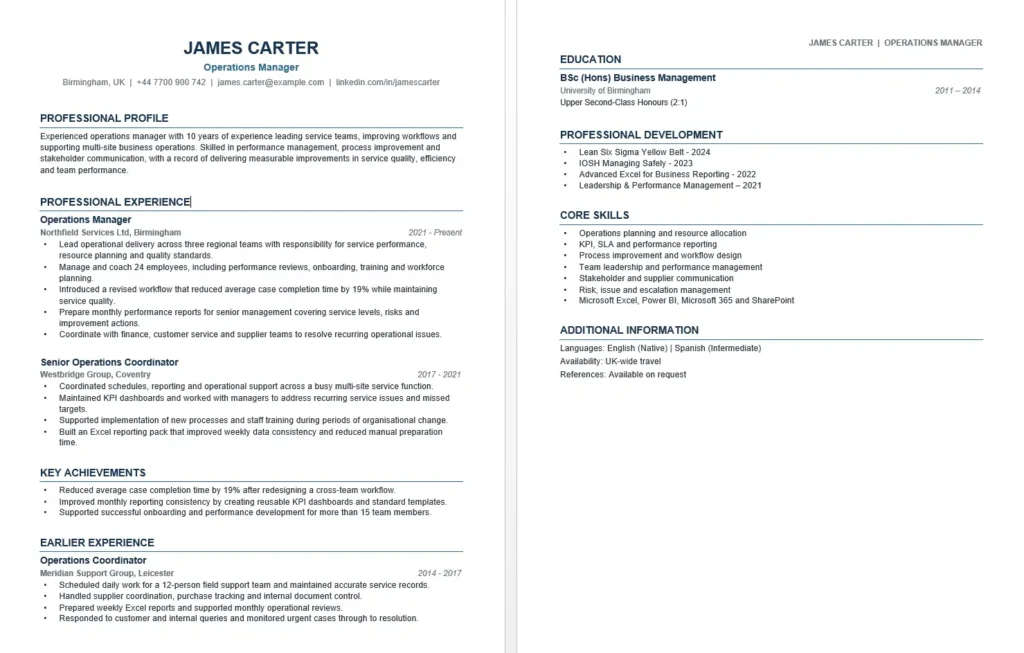
The preview below shows both pages of the same Microsoft Word CV available to download on this page.
Template Details
File: Microsoft Word (.docx)
Length: Two A4 pages
Photo: No
Example role: Operations Manager
Example career: Experienced professional
Account required: No
Why This Example Needs Two Pages
The downloadable CV is written for James Carter, an Operations Manager with around ten years of career history. His current leadership experience, earlier operational roles, achievements, education and professional development cannot all be presented usefully on one page without making the document unnecessarily compressed.
- Page one establishes his professional level. The reader can quickly see that he manages teams, operations and performance.
- Recent experience receives more space. His current and more relevant roles are explained in greater detail.
- Earlier experience is still visible. It provides career progression without dominating the CV.
- Education and professional development remain available. They do not push stronger recent evidence down the first page.
- The second page adds new information. It does not repeat the professional profile or duplicate the skills already explained elsewhere.
Page One Has One Job: Establish Why You Are Relevant
The first page should not be treated as a table of contents for the second. It should already give the employer enough information to understand your level, direction and strongest evidence.
Usually Prioritise
- your name and contact details;
- a concise professional profile when it adds value;
- your current or most relevant role;
- recent achievements that support the vacancy;
- another strongly relevant position if space allows;
- a qualification or certification when it is essential to the job.
The exact order can change. For example, a regulated profession may need a required qualification to be immediately visible, while an experienced manager may be better served by leading with recent leadership experience.
Page Two Should Continue the Argument, Not Start a New CV
Page two should feel like a continuation of the same application. Its job is to add relevant depth once the strongest evidence has already been established.
Depending on your background, page two may contain:
- earlier relevant employment;
- additional achievements;
- education;
- professional development;
- certifications;
- technical skills;
- projects;
- professional memberships;
- languages;
- other information that genuinely supports the vacancy.
These sections do not belong on page two by rule. They belong wherever their importance justifies placing them.
Do Not Split the CV at an Arbitrary Point
A two-page CV should have a natural page break. Avoid deciding that page one must end after a certain section simply because a template originally looked that way.
A Better Page Break
Try to end page one after a complete job entry, achievement block or section whenever possible. This makes the reading flow easier to follow.
An Awkward Page Break
A job title appears at the bottom of page one but all of its bullet points begin on page two. Or a heading sits alone at the bottom with its content on the next page.
If this happens in Word, first look for a small adjustment to paragraph spacing, bullet length or section order rather than moving half the CV around unnecessarily.
How the Two-Page CV Example Is Divided
The example CV does not simply divide its content into equal halves. Page one contains the evidence most likely to establish James Carter as an experienced operations candidate.
Page One: Professional Positioning and Recent Experience
Experienced operations manager with 10 years of experience leading service teams, improving workflows and supporting multi-site business operations. Skilled in performance management, process improvement and stakeholder communication, with a record of delivering measurable improvements in service quality, efficiency and team performance.
Operations Manager
Northfield Services Ltd | Birmingham
2021–Present
- Lead operational delivery across three regional teams with responsibility for service performance and resource planning.
- Manage and coach 24 employees and support performance reviews, training and workforce planning.
- Introduced a revised workflow that reduced average case completion time by 19%.
- Prepare monthly performance reports for senior management covering service levels, risks and improvement actions.
Senior Operations Coordinator
Westbridge Group | Coventry
2017–2021
Page one therefore already establishes leadership, scale, operational responsibility and measurable improvement before the reader reaches the second page.
Page Two: Supporting Career Evidence
The second page continues with earlier experience and then provides education, professional development, core skills and additional information. These sections remain useful, but they do not need to push current management experience further down page one.
Recent Roles Should Usually Get More Detail Than Older Roles
A common reason two-page CVs become unnecessarily long is that every job receives the same amount of detail.
Recent Relevant Role
You may need several bullets covering:
- scope of responsibility;
- team size;
- systems or processes;
- important achievements;
- stakeholder responsibility;
- role-specific technical work.
Older or Less Relevant Role
It may need only:
- job title;
- employer;
- dates;
- one or two useful responsibilities or achievements.
This preserves career progression without giving an eight-year-old position the same weight as your current role.
Do Not Bury Your Best Achievement on Page Two
If one achievement is especially relevant to the vacancy, it should not automatically be pushed to the second page simply because it belongs to an older position or a separate achievements section.
For example, an operations vacancy focused on process improvement may care more about:
Introduced a revised workflow that reduced average case completion time by 19%.
than a long list of routine responsibilities from the candidate’s current role.
Use the vacancy to decide which evidence deserves prominent space.
What If Page Two Looks Half Empty?
A second page does not have to be filled from top to bottom simply to justify its existence. Some white space is normal. The more important question is whether the information on that page adds enough value to require a second page.
A Partly Empty Page Two Can Be Fine When…
- the information is strongly relevant;
- removing it would weaken the application;
- compressing everything onto page one would make the layout crowded;
- the page still looks intentional and professionally structured.
Consider Returning to One Page When…
- page two contains only a few generic skills;
- the only remaining content is references or hobbies with little relevance;
- older experience is being included simply to create length;
- the important content could fit comfortably on one page after minor editing.
Should Your Name Appear on Page Two?
Your main contact information belongs clearly on page one. On page two, a small identifier such as your name can be useful, particularly when documents may be printed or pages separated.
You do not need to repeat the entire large header, profile, telephone number, email address and location again unless there is a practical reason to do so.
Keep any repeated page-two identifier small so it does not consume space intended for new information.
Two Pages Does Not Mean Your Entire Career History
An experienced candidate may have more information than two pages can hold, but that does not mean every job deserves a full description.
Older roles can often be compressed when they no longer add much new evidence:
Earlier Experience
Operations Coordinator — ABC Services | 2014–2017
Customer Service Supervisor — XYZ Group | 2011–2014
This keeps career continuity visible without allowing older work to dominate the application.
If an older position is unusually relevant to the vacancy, however, it can still deserve more detail. Relevance matters more than age alone.
Two-Page CV Mistakes That Waste the Extra Space
- Repeating the profile on page two. The second page should add new evidence.
- Giving every job the same number of bullets. Detail should reflect relevance.
- Saving the strongest achievement for later. Important evidence should be easy to find.
- Using page two as storage. Old courses, outdated skills and irrelevant jobs do not become useful simply because space exists.
- Splitting a job awkwardly between pages. Keep entries together where practical.
- Starting page two with a stranded bullet. Adjust the page break so the reader understands what the bullet belongs to.
- Making page one weak because page two exists. The first page still needs to make sense on its own.
- Trying to fill every centimetre. White space is better than weak content.
- Keeping two pages when the CV naturally fits on one. Length should follow content, not the other way around.
How to Edit the Two-Page Template in Microsoft Word
- Download the DOCX file and open it in Microsoft Word.
- Replace James Carter’s name and contact details with your own.
- Identify the requirements of the role before deciding what belongs on page one.
- Add your current and strongest relevant experience first.
- Use more detail for recent relevant roles and less for older supporting roles.
- Add education, professional development and skills where their importance justifies placing them.
- Check the page break after replacing the example text.
- Avoid leaving a heading or job title alone at the bottom of a page.
- Remove sections that do not add useful evidence.
- Check both pages for consistent fonts, spacing, dates and heading styles.
- Keep an editable Word version before saving or exporting the final application file.
If the layout moves while editing, see our guide to editing a CV template in Microsoft Word.
One Page or Two Pages?
The better question is not “Which length is correct?” but “How much relevant evidence does this application need?”
Choose One Page When
- your relevant career history is short;
- the strongest information fits comfortably;
- a second page would contain mostly filler;
- you can remain readable without removing important evidence.
Choose Two Pages When
- you have several relevant positions;
- leadership or technical responsibilities require explanation;
- you have important achievements, projects or qualifications;
- one page would force strong evidence to be removed or overcrowded.
Download the Two-Page CV Template for Word
Download the editable two-page Word CV shown above and replace the example career history, achievements, education and professional development with your own relevant information.
Microsoft Word (.docx) • Two A4 pages • Editable • No account required
Two-Page CV FAQs
Is a two-page CV too long?
Not when the second page contains relevant information that helps demonstrate your suitability. A two-page CV becomes unnecessarily long when the extra space is filled with repeated, outdated or irrelevant material.
Does education always belong on page two?
No. An experienced professional may place education later because recent work experience is stronger evidence. A qualification that is essential to the role may deserve a more prominent position.
Can a job continue onto page two?
It can, but avoid an awkward split where the job title is separated from all of its content. When possible, keep the entry together or create a page break at a natural point.
Is it a problem if page two is not completely full?
No. A partly empty second page can still be appropriate when the content is relevant and the document looks intentional. Do not add filler simply to use the remaining space.
Should my name appear on page two?
A small name identifier can be useful, particularly if printed pages could become separated. You do not usually need to repeat the entire large contact header.
Should experienced candidates always use two pages?
No. An experienced candidate can still use one page for a very focused application. Use two pages when the extra space is needed to present relevant evidence clearly.
Is this template guaranteed to work with every ATS?
No CV template can guarantee compatibility with every applicant tracking system. If a particularly simple one-column structure is your main priority, see the ATS-friendly CV template for Word.
Related Word CV Templates
One-Page CV Template
For applicants whose strongest relevant evidence fits comfortably on a single A4 page.
Professional CV Template
A polished Word layout for business and experienced professional applications.
ATS-Friendly CV Template
A simplified one-column Word format with conventional headings and text-based career information.