
FREE ONE-PAGE CV TEMPLATE FOR WORD
Need to keep your CV to one page without shrinking everything or deleting useful experience? This editable Word template shows how to give the most relevant information more space, compress older details and recognise when a second page would actually be the better choice.
Microsoft Word (.docx) • One A4 page • Editable • No account required
Should Your CV Actually Be One Page?
One page is useful when it gives you enough room to make a convincing case for the job. It stops being useful when important evidence has to be removed, the font becomes uncomfortable to read or every section is squeezed together.
One Page Can Work Well When…
- your professional history is relatively short;
- you are applying for a focused role;
- only a few recent positions are strongly relevant;
- your qualifications can be presented briefly;
- projects or certifications do not require lengthy explanation;
- the strongest evidence fits comfortably on one page.
Consider Two Pages When…
- you have several relevant positions;
- important achievements are being removed only to meet the page limit;
- your work requires technical projects or qualifications that need explanation;
- the document has become visually crowded;
- you are reducing the font or margins simply to stop text moving to page two.
If the second description sounds more like your situation, use the two-page CV template for Word instead. One page should be a useful format choice, not a rule you have to obey.
One-Page CV Template Preview
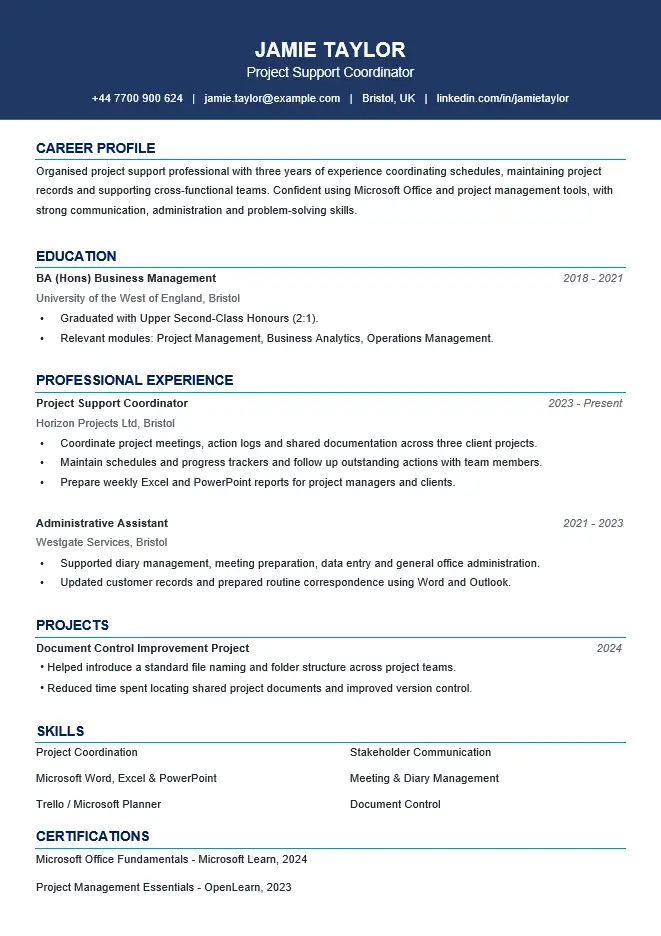
The preview below shows the same one-page layout included in the downloadable Microsoft Word file.
Template Details
File: Microsoft Word (.docx)
Length: One A4 page
Photo: No
Example role: Project Support Coordinator
Example experience: Early professional career
Account required: No
Why This CV Fits on One Page
The example belongs to Jamie Taylor, a Project Support Coordinator with a focused early-career background. The document fits on one page because the information has been prioritised rather than simply made smaller.
- Recent experience receives the most space. The current project support role carries more detail than older information.
- Earlier experience is compressed. Older responsibilities do not repeat points already demonstrated in the current position.
- Education is concise. Qualifications are present without occupying a large part of the page.
- Projects and skills are selective. Only information that contributes to the target role is retained.
- Optional sections do not control the design. The candidate does not keep content simply because a CV template happens to contain space for it.
This is the main principle behind a useful one-page CV: give space according to relevance, not according to the number of sections available in the template.
Think of One Page as a Space Budget
When space is limited, every section competes for attention. You do not need to give education, skills, older employment and recent employment equal amounts of room.
Give More Space To
- your most relevant recent position;
- achievements that directly support the vacancy;
- tools, systems or qualifications specifically useful for the role;
- a relevant project when it adds evidence not shown elsewhere.
Give Less Space To
- older jobs with similar responsibilities;
- qualifications that have become less important as your career developed;
- generic skills already demonstrated through your experience;
- certifications unrelated to the vacancy;
- background information that does not help the employer evaluate you.
The aim is not to make every section equally short. It is to make the strongest evidence easy to find.
How the One-Page CV Example Uses Its Space
The downloadable example targets project support and coordination work. The content below shows why some information deserves more room than other information.
Professional Profile
Organised project support professional with experience coordinating schedules, maintaining project records and supporting cross-functional teams. Confident using Microsoft Office and project management tools, with practical experience preparing reports and keeping project information organised.
The profile is short because the work experience underneath provides the detailed evidence. There is no need to repeat every skill at the top of the page.
Most Relevant Role
Project Support Coordinator
Horizon Projects Ltd | Bristol
2023–Present
- Coordinate project meetings, action logs and shared documentation across client projects.
- Maintain schedules and progress trackers and follow up outstanding actions with team members.
- Prepare weekly reports using Excel and PowerPoint for project managers and clients.
- Helped introduce a consistent document naming process to make project files easier to locate.
This role gets more space because it most closely supports the type of position Jamie is targeting.
Earlier Role
Administrative Assistant
Westgate Services | Bristol
2021–2023
- Supported diary management, meeting preparation, data entry and general office administration.
- Updated customer records and prepared routine correspondence using Microsoft Word and Outlook.
The earlier role receives fewer bullets. It still adds useful background, but repeating four more administrative duties would make the page longer without necessarily making the application stronger.
What Should You Cut First?
If your CV has just moved onto page two, do not start by reducing every font size. First look for content that is using space without adding new evidence.
1. Repeated Responsibilities
If three jobs all say that you answered emails, attended meetings and worked in a team, you probably do not need to explain the same point in full under every position.
2. Too Much Detail About Older Jobs
An older role can remain on the CV without receiving the same number of bullet points as your current position. Keep the detail that still matters to the vacancy.
3. Generic Skills
If your experience already demonstrates organisation, teamwork and communication, a long separate list repeating the same qualities may not deserve much space.
4. Irrelevant Qualifications or Courses
Keep qualifications that matter to the application. Avoid using valuable space simply to create a complete history of every short course you have ever completed.
5. An Overlong Profile
If the profile repeats information that appears immediately below it, shorten it or remove it. The top of a one-page CV is valuable space.
Before You Delete Something, Try Compressing It
Some information deserves to remain but does not need a full paragraph or several bullets.
Long Version
Responsible for organising weekly team meetings and making sure invitations were sent to everybody attending. I also prepared the meeting agenda, took notes during the meeting and sent actions to colleagues afterwards.
More Compact Version
Coordinated weekly team meetings, prepared agendas and circulated action notes to attendees.
The shorter version preserves the useful responsibility while removing explanation that a reader does not need.
Do Not Solve Page Two by Making the CV Hard to Read
A CV that technically fits on one page can still be a poor one-page CV. If the layout only works after aggressive formatting changes, reconsider the content before forcing the document to stay on one page.
Better First Steps
- remove duplicated bullets;
- shorten long sentences;
- reduce detail from older positions;
- remove unused optional sections;
- combine related information;
- prioritise information for the target vacancy.
Be Careful With
- very small body text;
- almost no white space;
- extremely narrow margins;
- large blocks of compressed text;
- removing important evidence purely to avoid page two.
The “One Line on Page Two” Problem
Sometimes a CV is effectively one page but a heading, single bullet or final line moves onto page two after you replace the example text.
In that situation, look for a small content or spacing problem before redesigning the entire document:
- Check whether one long bullet can be rewritten more concisely.
- Remove unnecessary paragraph spacing.
- Look for an empty paragraph accidentally created in Word.
- Check whether a heading is set to stay with the following paragraph.
- Remove an optional line that adds little to the application.
- Check whether replacing example text has created an extra wrapped line elsewhere.
If a substantial amount of relevant content is moving to the next page, however, the problem may not be formatting. You may simply need a two-page CV.
One Page for Different Career Stages
Student
One page may provide enough space when education, a small amount of experience, volunteering and relevant skills can be presented clearly. For a structure designed specifically around current study, see the student CV template.
Graduate
A graduate may be able to combine a recent degree, placement or internship, projects and early work experience on one page. Candidates with substantial placements or several relevant roles may need more room. See the graduate CV template.
Early-Career Professional
This is the situation represented by the downloadable example. Recent professional experience receives most of the page while older information is compressed.
Experienced Professional
A one-page CV can still work when the application is deliberately focused, but candidates with a substantial amount of directly relevant experience should not remove strong evidence simply to preserve a one-page format.
When One Page Is the Wrong Choice
Switch to a longer format when the page limit starts working against the application rather than improving it.
- A highly relevant position has been reduced to one vague bullet.
- Several strong achievements have been removed.
- Technical projects cannot be explained clearly.
- Relevant certifications or qualifications have disappeared only because of space.
- The page looks crowded even after irrelevant content has been removed.
- The font and spacing have been reduced to uncomfortable levels.
At that point, the two-page CV template gives you room to keep relevant evidence without overcrowding the document.
How to Edit the One-Page Template in Microsoft Word
- Download the DOCX file and open it in Microsoft Word.
- Replace Jamie Taylor’s name and contact details with your own.
- Decide which job or type of role you are targeting before replacing the example content.
- Add your most relevant recent experience first.
- Give older or less relevant roles less space.
- Replace the education, project and skills information with your own.
- Remove optional sections that do not strengthen the application.
- Check whether your own text has caused lines or sections to move onto a second page.
- Shorten content before making aggressive changes to font size or margins.
- If relevant information still does not fit comfortably, use a two-page version instead.
If the Word layout moves while you edit the document, see our guide to editing a CV template in Microsoft Word.
Download the One-Page CV Template for Word
Download the editable one-page Word CV shown above and replace the example content with your own most relevant experience, education, projects and skills.
Microsoft Word (.docx) • One A4 page • Editable • No account required
One-Page CV FAQs
Is a one-page CV always better?
No. One page works when it provides enough room for the evidence relevant to your application. A longer CV may be more appropriate when cutting to one page would remove useful experience or make the document difficult to read.
What should I remove first if my CV goes onto page two?
Look first for repeated responsibilities, excessive detail in older jobs, irrelevant courses, generic skills and an overlong profile. Do not begin by deleting strong recent evidence simply because it occupies space.
Should I reduce the font size to make my CV one page?
Small adjustments may sometimes help, but content should usually be reviewed first. If fitting the page requires text that is uncomfortable to read or extremely tight spacing, a second page may be more useful.
Can an experienced professional use a one-page CV?
Yes, particularly for a focused application where only a selection of recent experience is relevant. Candidates with extensive directly relevant career history may need two pages to present that evidence properly.
Why did my CV become two pages after I edited the template?
Your replacement text may be longer than the example, causing a bullet, heading or paragraph to wrap onto an extra line. Check content length, empty paragraphs, paragraph spacing and page layout before making major formatting changes.
Is this template guaranteed to work with every ATS?
No CV template can guarantee compatibility with every applicant tracking system. If reducing layout complexity for online applications is your main priority, see the ATS-friendly CV template for Word.
Related Word CV Templates
Two-Page CV Template
For candidates who need more room for relevant career history, achievements, qualifications or professional development.
Graduate CV Template
For recent graduates balancing degree information with projects, placements and early work experience.
Simple CV Template
A straightforward Word format when ease of editing and a clean presentation are your main priorities.