
UK ADMINISTRATIVE ASSISTANT CV EXAMPLE
A practical guide to showing what you actually organise, coordinate, record and improve — rather than filling your CV with generic claims about being organised and hardworking.
An Administrative Assistant CV can look deceptively simple. Many applicants list Microsoft Office, diary management, telephone calls, emails and filing, but those phrases alone tell an employer very little about the level of responsibility involved.
There is a considerable difference between occasionally booking appointments and coordinating several busy diaries, preparing meeting papers, handling last-minute changes and making sure actions are followed up. The same applies to records, spreadsheets, customer enquiries and office systems.
A stronger CV makes that difference visible. It shows what you supported, how much responsibility you carried, who you worked with, which systems you used and how your administration helped the office run more smoothly.
Free Administrative Assistant CV Templates for Word
Both examples below are completed, editable Microsoft Word DOCX files. Choose the one closest to your level of responsibility, then replace the sample content with your own experience.
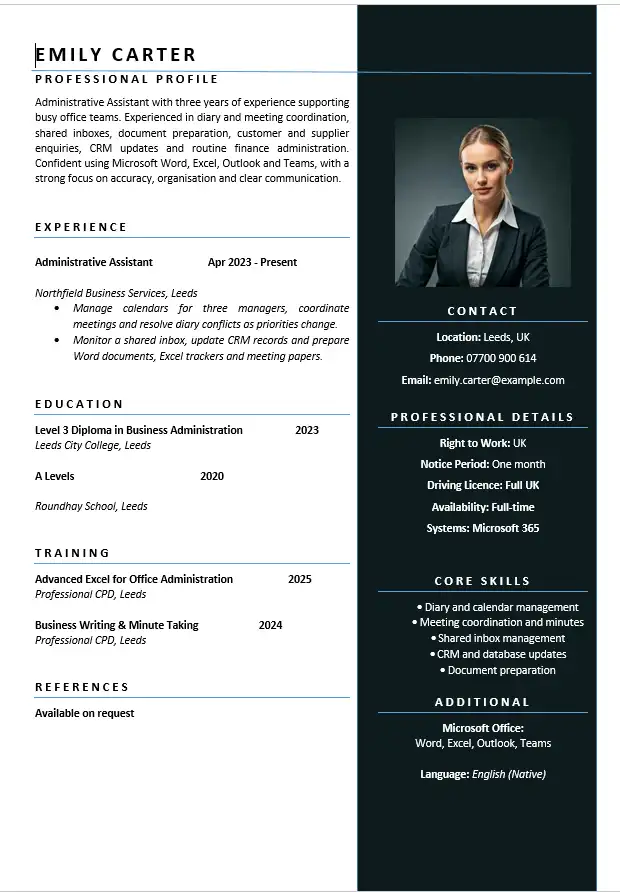
Administrative Assistant CV
For administrators who coordinate diaries and meetings, manage shared inboxes, update CRM records and prepare documents.
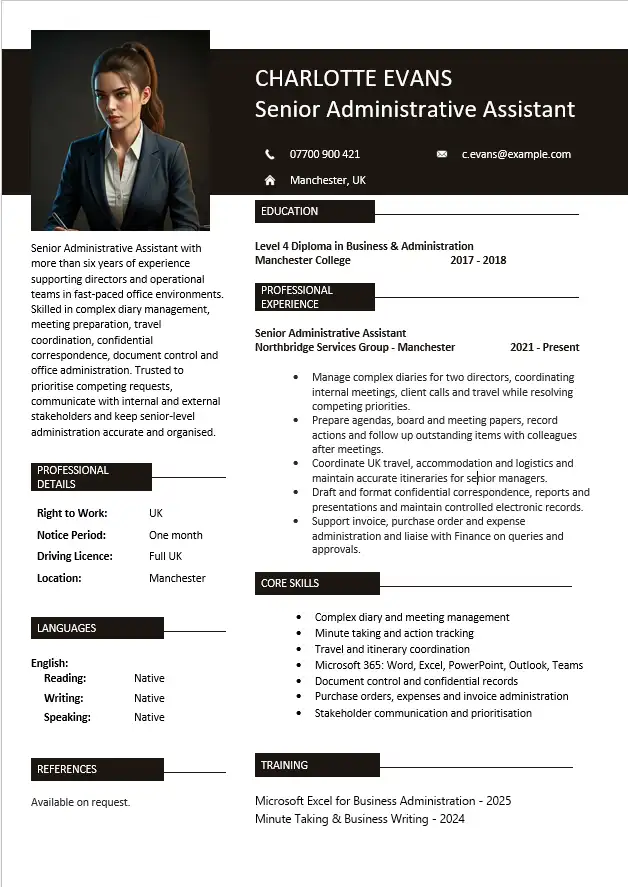
Senior Administrative Assistant CV
For experienced administrators supporting senior managers with complex diaries, travel, confidential documents and meeting preparation.
What Employers Need to Understand Quickly
Administrative Assistant is a broad job title. Two people with exactly the same title can be doing very different jobs.
One role may mainly involve reception, data entry and telephone enquiries. Another may involve managing managers’ diaries, preparing board papers, organising travel, processing invoices and maintaining confidential employee records.
Your CV therefore needs to answer several practical questions early:
- Who or what did you support?
- Which administrative processes did you handle yourself?
- How busy or complex was the environment?
- Which software and systems did you use regularly?
- Did you deal with customers, suppliers, managers or other departments?
- Were you trusted with confidential or sensitive information?
- What became quicker, clearer or more reliable because of your work?
Those details usually say more about your suitability than simply describing yourself as organised, efficient and a good communicator.
Administrative Assistant, Office Administrator, PA or Receptionist?
Administrative job titles often overlap, so do not rely on the title alone when deciding what to include in your CV.
Administrative Assistant
Usually provides general support to an individual, team or department. Tasks may include correspondence, records, spreadsheets, meetings, enquiries, documents, expenses, databases and office coordination.
Office Administrator
Often has a wider focus on keeping office processes running, which may include supplies, facilities, records, finance administration, systems and coordination between departments.
Personal or Executive Assistant
Usually supports one or more senior people more closely. Complex diary management, travel, confidential correspondence, meeting preparation and protecting an executive’s time may carry greater importance.
Receptionist
Normally places greater emphasis on front-of-house work, visitors, telephone calls, appointments and being the first point of contact, although many receptionist roles also include substantial administration.
If your official title was Administrative Assistant but you regularly performed higher-level coordination, show those responsibilities. You do not need to invent a more senior job title to demonstrate the level at which you worked.
Best Format for an Administrative Assistant CV
For most applicants, a clear reverse-chronological CV works well. Recent administrative experience is usually the strongest evidence, so employers should not have to search through the document to find it.
- Name and contact details
- Professional profile
- Core administrative skills and systems
- Employment history
- Education
- Relevant training or certifications
For an experienced administrator, the employment section deserves more space than a long generic skills list. For someone moving into administration for the first time, transferable evidence from retail, hospitality, customer service, healthcare, education or other office-based work can carry more weight.
How to Write an Administrative Assistant CV Profile
The profile should position you quickly. It does not need to claim that you are an exceptional multitasker or passionate team player. It should establish the type of administration you have done and the areas in which you can be useful.
A profile that says very little
Hardworking and organised Administrative Assistant with excellent communication skills. A reliable team player who can work under pressure and is looking for a new challenge.
None of those qualities are necessarily wrong, but almost any applicant could write the same paragraph.
Stronger Administrative Assistant profile example
Administrative Assistant with four years of experience supporting a busy operations team, coordinating diaries and meetings, preparing documents and reports, maintaining confidential records and responding to customer and supplier enquiries. Confident using Microsoft 365, including Outlook, Word and Excel, with practical experience improving filing and tracking processes.
This version gives the reader an immediate picture of the candidate’s working environment, responsibilities and software knowledge.
Do Not Turn the Experience Section Into a List of Office Duties
Administrative CVs are particularly vulnerable to repetitive duty lists:
- Answered telephone calls
- Responded to emails
- Managed diaries
- Booked meetings
- Updated spreadsheets
- Completed general administration
The problem is not that these duties are unimportant. The problem is that they give no sense of scale, ownership or difficulty.
Instead of only naming the activity, add enough context to show what the work involved.
Diary management
Basic: Managed diaries and booked meetings.
Better: Managed diaries for three senior managers, coordinated internal and external meetings and resolved scheduling conflicts as priorities changed.
Meeting administration
Basic: Organised meetings.
Better: Scheduled weekly operational meetings, prepared agendas and papers, recorded actions and distributed minutes to attendees after each meeting.
Records and databases
Basic: Maintained records.
Better: Maintained customer and supplier records across the company CRM, checked incomplete entries and followed up missing documentation before cases progressed.
Show What You Actually Organised
Organisation is one of the most frequently claimed skills on an admin CV, but it becomes much more credible when the reader can see what had to be organised.
Useful examples may include:
- multiple managers’ calendars
- appointments and interview schedules
- meeting rooms and online meetings
- travel and accommodation
- training sessions
- office events
- customer or client appointments
- project documentation
- annual leave or team rotas
- invoice approval or expense paperwork
You do not need impressive numbers for every task. A sentence explaining that you coordinated appointments across several departments can be more informative than an invented percentage about increased efficiency.
Diary and Calendar Management
If diary management is important to the vacancy, explain more than the software used.
For example:
- Managed Outlook calendars for two directors and the Operations Manager.
- Coordinated internal meetings, customer appointments and supplier calls across competing diaries.
- Rearranged appointments when priorities changed and communicated updates to attendees.
- Protected time for deadlines, preparation and travel rather than simply accepting every invitation.
The final point can be particularly relevant for PA and Executive Assistant roles, where diary management is partly about judgement and prioritisation rather than simply booking available slots.
Meetings: Show the Work Before and After the Meeting
Writing “meeting coordination” in a skills section is useful, but your employment history can show whether you were responsible for the full process.
That may include:
- finding suitable dates
- booking rooms or online meeting links
- preparing agendas
- circulating papers
- taking minutes
- recording actions
- following up outstanding items
These details demonstrate organisation, accuracy and communication without needing to tell the reader that you possess those qualities.
Microsoft Office Skills: Be More Specific
“Microsoft Office” is too broad when the software is an important part of the job. If you genuinely use these applications, state what you can do with them.
Microsoft Word
Formatting reports, correspondence, templates, letters, meeting papers or mail merges is more informative than simply listing Word.
Microsoft Excel
You might mention maintaining trackers, cleaning data, creating basic reports, using filters, tables, PivotTables or formulas — but only include functions you can actually use.
Microsoft Outlook
Shared inboxes, calendar management, meeting invitations and contact management may be particularly relevant for administrative roles.
Microsoft Teams and SharePoint
If you work in a hybrid office, experience coordinating Teams meetings, managing shared documents or using SharePoint can be worth mentioning where relevant.
CRM, Database and Record-Keeping Experience
Many administrative jobs involve systems that are specific to the employer. You may not have used the exact platform listed in a vacancy, but experience maintaining another CRM, database, case-management or booking system can still be relevant.
Explain what you used the system for:
- creating and updating records
- checking data accuracy
- uploading documents
- tracking enquiries or cases
- maintaining contact information
- producing reports
- monitoring outstanding actions
This is stronger than adding a long software list with no evidence of how the systems were used.
Confidentiality Is More Than a Soft Skill
Administrators may have access to employee records, customer information, financial documents, recruitment paperwork, medical information or commercially sensitive correspondence.
If confidentiality formed a genuine part of your work, show the context without revealing confidential information.
For example:
- Maintained confidential personnel records and controlled access to HR documentation.
- Processed sensitive customer documentation in line with internal data-handling procedures.
- Prepared confidential correspondence for senior management and maintained secure digital records.
Administrative Finance Tasks Can Be Valuable Evidence
You do not need to be an accountant for routine finance administration to strengthen an Administrative Assistant CV.
If applicable, include experience such as:
- raising purchase orders
- processing or checking invoices
- matching receipts
- staff expenses
- credit card reconciliations
- basic budget trackers
- supplier queries
- petty cash
The wording should make clear that these were administrative responsibilities rather than claiming accounting expertise you did not have.
Reception, Customer and Supplier Contact
Administrative work often sits between several groups of people. If you were the person others contacted when they needed information, documents or an appointment, that is worth showing.
Instead of:
Excellent communication skills.
You could demonstrate it through work:
Acted as a first point of contact for customer and supplier enquiries by telephone and email, resolving routine requests and directing more complex issues to the appropriate colleague.
Administrative Assistant CV Example
The following fictional example shows how an experienced administrator could turn routine responsibilities into useful evidence. You can download both Word versions above.
Hannah Clarke
Administrative Assistant
Leeds, UK
hannah.clarke@example.com | 07700 900 614
Professional Profile
Administrative Assistant with four years of experience supporting operations and management teams in busy office environments. Experienced in diary and meeting coordination, document preparation, shared inbox management, customer and supplier communication, confidential records and finance administration. Confident using Microsoft 365, including Outlook, Word, Excel and Teams, with a practical approach to prioritising changing workloads and maintaining accurate information.
Core Skills
- Diary and calendar management
- Meeting coordination and minutes
- Microsoft Outlook, Word, Excel and Teams
- Document and records management
- Shared inbox management
- Customer and supplier enquiries
- Invoice and expense administration
- CRM and database updates
- Confidential information handling
Administrative Assistant | Northfield Business Services
Leeds | April 2023 – Present
- Manage calendars for three managers, arranging internal meetings, supplier calls and customer appointments and resolving diary conflicts as priorities change.
- Coordinate weekly operational meetings, prepare agendas and supporting documents, record actions and distribute minutes.
- Monitor a shared departmental inbox, respond to routine enquiries and direct specialist queries to the appropriate team member.
- Maintain customer and supplier information within the CRM and follow up missing documentation before records are completed.
- Prepare Word documents, Excel trackers and monthly administrative reports for the operations team.
- Process purchase orders, invoice queries and staff expense documentation for manager approval.
- Maintain confidential employee and business records using agreed document-control procedures.
Office Administrator | Westbridge Property Services
Leeds | July 2021 – March 2023
- Handled telephone and email enquiries from customers, contractors and suppliers and maintained clear records of follow-up actions.
- Scheduled appointments for field staff and updated customers when timings or availability changed.
- Created and maintained digital filing systems for contracts, invoices and property documentation.
- Updated Excel trackers used to monitor appointments, outstanding documents and supplier activity.
- Ordered office supplies and coordinated deliveries while maintaining agreed stock levels.
Education
Level 3 Diploma in Business Administration
Leeds City College | 2021
Administrative Assistant CV Example with No Direct Admin Experience
You can move into administration without already holding the title Administrative Assistant. The important part is identifying work that demonstrates the same underlying responsibilities.
A retail employee, for example, may already have experience with customer enquiries, cash records, stock systems, rotas, email communication and resolving problems. A healthcare worker may have experience maintaining records, booking appointments and handling sensitive information.
A useful profile might read:
Customer service professional moving into office administration, with experience handling telephone and email enquiries, updating customer records, processing documentation and coordinating day-to-day requests in a high-volume environment. Confident using Microsoft Word, Outlook and Excel, with a strong record of accuracy and following procedures.
The wording is credible because it connects existing experience to administrative work rather than pretending the candidate has already performed a different job.
Administrative Assistant Skills for a CV
The strongest skills section is usually a mixture of administrative tasks, software and specialist knowledge relevant to the vacancy.
- Diary management
- Meeting scheduling
- Minute taking
- Document preparation
- Microsoft Word
- Microsoft Excel
- Microsoft Outlook
- Microsoft Teams
- CRM or database administration
- Data entry and record keeping
- Shared inbox management
- Customer service
- Travel coordination
- Invoice processing
- Purchase orders
- Expense administration
- Digital filing
- Confidential information handling
Do not add all of these simply because they appear in a sample. Select the ones you genuinely use and that matter to the particular vacancy.
How to Demonstrate Soft Skills Without Listing Them
Administration vacancies frequently mention organisation, communication, attention to detail, initiative, confidentiality and the ability to prioritise. Your work history can demonstrate these more convincingly than a list of adjectives.
Organisation: explain the calendars, meetings, projects, appointments or records you coordinated.
Attention to detail: show responsibility for checking records, documentation, invoices, meeting papers or data accuracy.
Communication: identify who you communicated with and for what purpose.
Prioritisation: describe environments where deadlines, diaries or requests competed for attention.
Initiative: mention a process you improved, tracker you created, recurring problem you resolved or task you began handling independently.
Numbers Can Help, but Do Not Force Them
There is a growing tendency to turn every CV bullet into a percentage. That does not suit every administrative task.
Use numbers when they add genuine context:
- supported three senior managers
- processed around 80 invoices each month
- coordinated appointments for a team of 12
- maintained records for more than 500 customers
- handled a shared inbox receiving approximately 40 enquiries a day
If you do not know the number, do not invent one. Describing the process accurately is better than adding an unsupported statistic.
Tailor the CV to the Administrative Job Description
Administrative vacancies can differ significantly, even when the job title is identical. Read the job description for recurring responsibilities and systems.
If the vacancy repeatedly mentions Outlook diary management, minute taking, confidential records and Excel, those areas deserve more visibility than unrelated duties from your current job.
Do not copy the employer’s wording into every sentence. Instead, identify where your own experience provides evidence that you can perform the requested work.
Common Administrative Assistant CV Mistakes
Writing “general admin duties”
This hides useful experience. Spell out the important parts of the administration you performed.
Listing Microsoft Office without explaining your level
If Excel or Outlook matters to the role, show what you actually use it for.
Repeating the same duties under every job
If three positions all say answered calls, emails, filing and data entry, the reader cannot see how your responsibilities developed.
Overloading the CV with soft skills
Organisation and attention to detail matter, but evidence of organised and accurate work is more useful than repeating the words.
Inventing efficiency improvements
You do not need to claim that every spreadsheet increased productivity by 35%. Use measurable results when you genuinely know them and describe useful responsibilities accurately when you do not.
Using an inflated job title
If you were an Administrative Assistant who occasionally supported senior management, explain that responsibility rather than changing your title to Executive Assistant unless that was genuinely your role.
Should an Administrative Assistant CV Be One or Two Pages?
Use the amount of space needed to present relevant evidence clearly. An early-career applicant may fit comfortably on one page, while someone with several relevant administrative positions may need two.
Do not shrink the font, reduce margins excessively or remove useful evidence just to force the document onto one page. Equally, avoid stretching limited experience across two pages with large gaps and repetitive skills.
If editing causes the layout to change unexpectedly, our guide explains what to check when your CV moves to a second page in Word.
Word or PDF for an Administrative Assistant CV?
An editable Word version is useful while you are tailoring the CV. Once the document is finished, follow the employer’s application instructions. If PDF is accepted, it can help preserve the final appearance across different devices.
If an employer specifically requests a Microsoft Word document, send the requested format rather than converting it simply because you prefer PDF.
If you are working from one of our templates, see how to edit a CV template in Microsoft Word without accidentally damaging the original layout.
Administrative Assistant CV Checklist
- Does the profile explain what kind of administration you have actually done?
- Can the reader see who or what you supported?
- Have you shown the important software rather than listing generic IT skills?
- Are diary, meeting and document responsibilities described with enough context?
- Have you included relevant CRM, database or record-keeping experience?
- Does the CV demonstrate communication rather than merely claiming it?
- Have you shown confidentiality where it genuinely formed part of the job?
- Are any finance-related administrative duties described accurately?
- Have you removed repetitive “general admin duties” statements?
- Are figures and achievements genuine and defensible?
- Does the most relevant experience receive the most space?
- Have you checked the CV against the actual vacancy before sending it?
Administrative Assistant CV FAQs
What should an Administrative Assistant put on a CV?
Prioritise relevant administrative experience, the people or teams you supported, diary and meeting responsibilities, document and record management, communication, software, databases and any specialist work such as invoicing or confidential records.
What is a good profile for an Administrative Assistant?
A useful profile identifies your level of experience, the type of environment in which you have worked and several relevant areas of responsibility. Avoid filling the opening paragraph with unsupported adjectives.
What are the best Administrative Assistant skills for a CV?
Commonly useful skills include diary management, meeting coordination, Microsoft Office, document preparation, record keeping, database or CRM administration, customer communication, minute taking and handling confidential information. The best selection depends on the vacancy.
Can I become an Administrative Assistant without experience?
Yes. Experience from customer service, retail, hospitality, healthcare, education and other roles can provide useful evidence of communication, record keeping, scheduling, organisation and computer use. Present the responsibilities you genuinely performed rather than pretending you already held an administrative position.
Should I include typing speed on an Administrative Assistant CV?
Include it when the vacancy asks for typing or transcription ability and you have a reliable measured speed. It does not need prominent space on every general administrative CV.
Should I include references?
You normally do not need to use valuable CV space for full referee details unless the employer requests them at the application stage.
Can I download an Administrative Assistant CV template in Word?
Yes. This page includes two free DOCX examples: an Administrative Assistant CV and a Senior Administrative Assistant CV. Both open and edit in Microsoft Word.
Related CV examples: Customer Service CV · Retail CV · Career Change CV · Professional CV Template
Build an Administrative CV Around Real Work
Use the example to understand the level of detail that can make administrative experience clearer, then replace every sample responsibility with evidence from your own work.